Design Thursday #96
A weekly recap of everything you need to know about tools, events, guidelines and design in general.


Figma Updates
Slots in open beta
Slots are now rolling out to everyone in open beta. Instead of creating endless variants or hiding layers inside a component, you can define a slot where any content can go. Add a menu item, swap an icon, or drop in a button, all without detaching from the main component.
Most useful for components you customize a lot, like cards, modals, or tabs. Fewer variants, fewer detaches, and instances keep receiving updates from the main component.
GitHub Copilot to Figma
GitHub Copilot can now connect to the Figma MCP server. So you can push rendered UI from VS Code to the Figma canvas as editable frames, or pull design context from Figma into Copilot to generate code that matches your existing designs. Available in VS Code today, CLI support coming soon.
Framer Convert
Framer introduced Convert, a new add-on that bundles Funnels, A/B Tests, and a new Triggers feature into one package. Triggers let you show dynamic content based on context. Display a banner to visitors from a specific referrer, update copy on certain dates, or trigger an overlay after someone scrolls past a certain point. It all works directly on Components and Overlays without needing a third-party tool.
Sketch Dublin Beta
Sketch has a new beta out. The biggest addition is selection colors. When you select multiple layers, the Inspector now shows all the colors in your selection in one place. Hover over a color to highlight which layers use it, or click the chevron to narrow your selection down to just those layers. A real time saver in complex files.
Independent borders are also new, so you can set different border widths per side of a rectangle or frame. There's a new Corner Settings panel with better smoothing controls, capsule support, and a "Max" option to keep corners fully rounded at any size. The eyedropper now recognizes Color Variables too, so you can pick and apply them directly without going through the panel.
On top of all that, there are 150+ improvements and fixes.

Effect Groups in Rive
Rive posted a new tutorial on Effect Groups, which let you apply path effects like Trim and Dash to multiple strokes and fills at once. The order of effects in the group also changes the visual result, which opens up some interesting options for more complex motion.
Penpot 2.14
The latest Penpot release is mostly focused on design tokens. You can now safely rename tokens without breaking existing connections across components and libraries. Tokens can also be organized into nested collapsible groups for easier navigation. And design tokens are now accessible via the Plugins API, so they can be read and edited programmatically. Great if you use Penpot MCP or build custom tooling on top of Penpot.
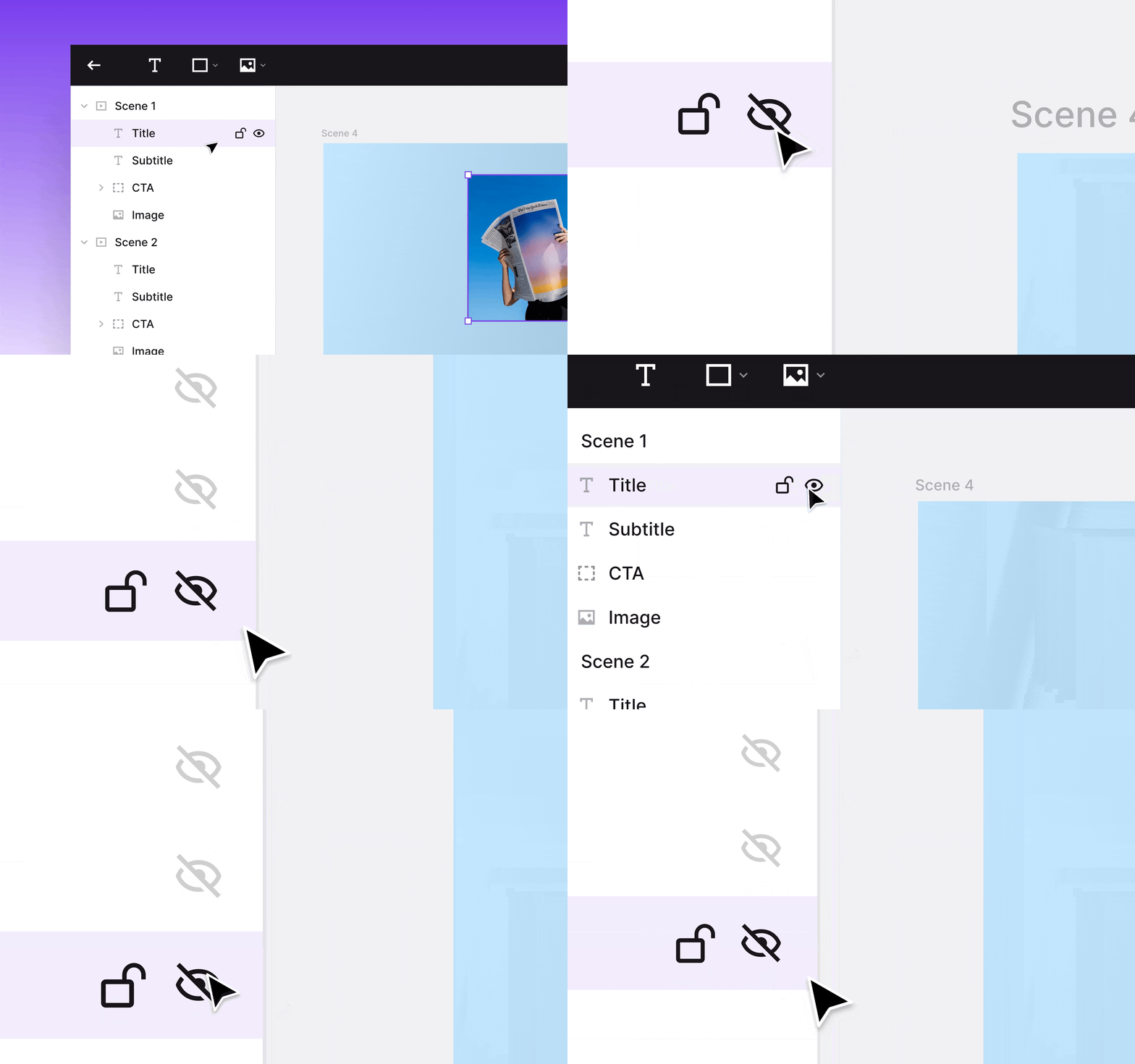
Jitter: Multi-layer hide and lock
Small but useful. You can now click and hold the hide or lock icon on any layer, drag down the list, and apply the same state to multiple layers at once. If you've ever had to toggle layers one by one in a complex file, you'll appreciate this.
Maze updates
Maze published a roundup of what shipped over the past couple of weeks. The main highlight is visual stimulus support for AI Moderator. It can now show images during sessions and discuss them with participants in real time, which opens it up for concept testing and brand evaluation, not just discovery interviews.
Other notable additions: two discussion modes for AI Moderator (freeform or structured), a matrix question type for comparative feedback, shareable filtered results via URL, and transcript editing in unmoderated studies.
LottieFiles Advanced Optimizer
LottieFiles released an Advanced Optimizer with much more granular controls. You can now simplify paths, reduce keyframe data, compress images, truncate property names, round float precision, and strip out metadata and unused properties, all individually. A lot more control over the balance between file size and fidelity.
Recraft V4 Prompt Engineering Guide
Recraft published a practical guide on prompting V4 effectively. Worth a read because it's specific to how the model responds to design intent. When a short prompt is enough versus when to go into detail, and how to structure prompts for things like style systems or production constraints.
How are design systems changing?
Dive Club published a conversation with Luis Ouriach, designer advocate at Figma, on how design systems are evolving with AI. They cover agentic design systems, what trends are actually worth paying attention to, and what Figma's integrations with Claude and Codex unlock in practice.
Inside an AI-native design org
Another strong Dive Club episode with Cameron Worboys, Head of Product Design at Cash App. He talks about what an AI-native design team actually looks like. More than 90% of designers at Cash are now shipping PRs, and the old engineering/product/design triad has been replaced by something new. Also covers what he looks for when hiring and his take on bespoke software.