Design Thursday #87
A weekly recap of everything you need to know about tools, events, guidelines and design in general.


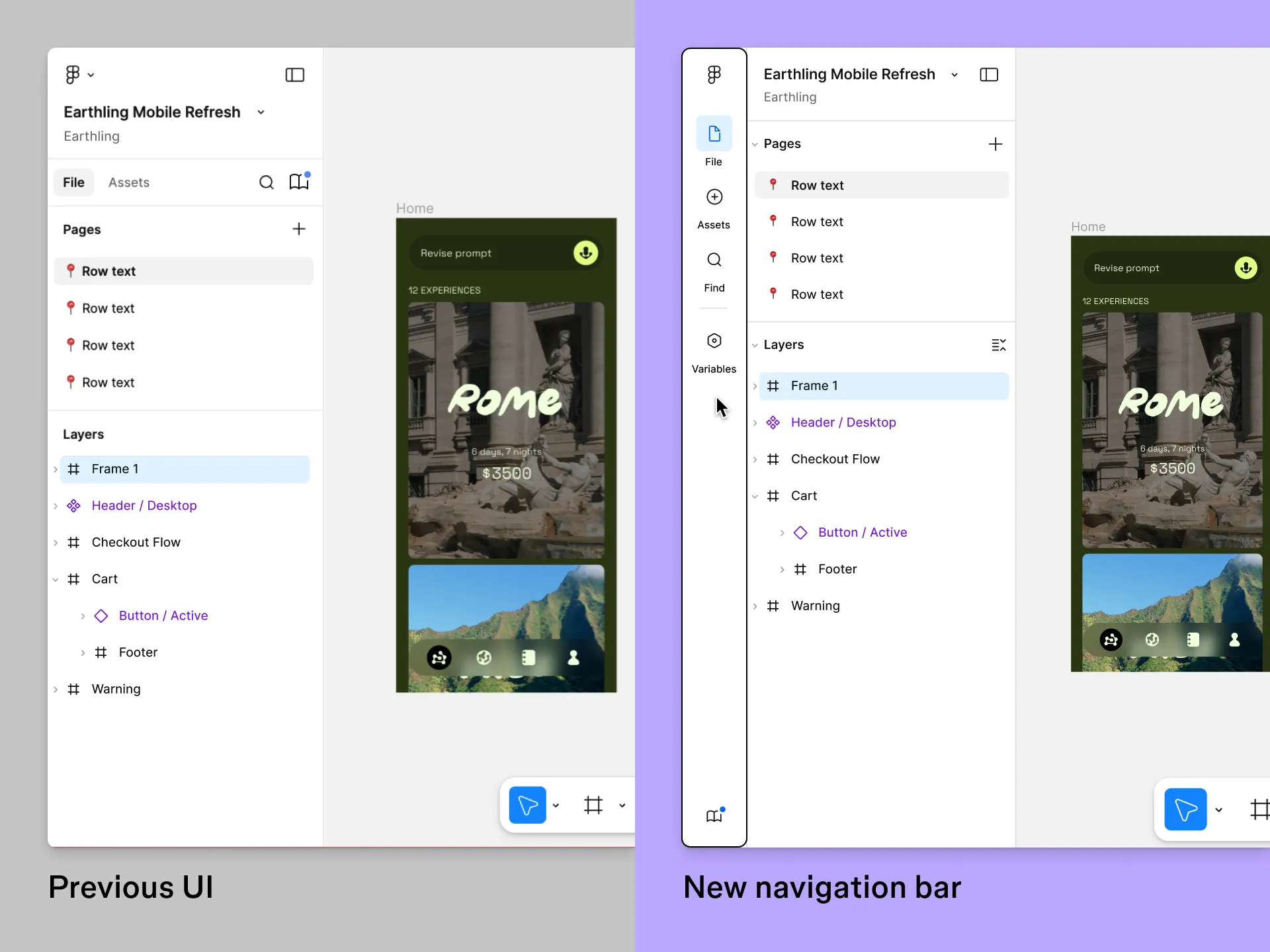
Figma's left navigation bar
Figma is updating the UI of Figma Design (also Draw & Dev Mode) with a new left navigation bar, which was first shown during Config. It should make it easier to switch between your layers, library assets, variables, and search. The variables panel will now take up the full screen, making it easier to edit multiple variables at once. You can still make the window smaller to see all the context of your design while changing a variable.
Read more about the left navigation bar
Protopie AI
Protopie announced their AI feature, which will let you build prototypes by prompting. This should make it a lot faster to build a realistic-looking prototyping while using mobile features like camera, haptics, ...
More frameworks support & auto annotations in Stark
Stark now has more code integrations, including support for Angular & Vue so you can scan the accessibility of even more projects. There is now also an AI-powered Focus Order annotation feature which will analyse your screen, pick the items that should get focus and automatically annotate the screen.
New Lovable Connectors
Lovable can now integrate with multiple new services to make even more powerful prototypes. Some of the new ones include:
- ElevenLabs: Bring voice and sound to your prototype with realistic voices.
- Perplexity: Add AI-powered search so you can find information on the web to bring into your app experience.
- Firecrawl: This will turn websites into structured data, great for price trackers or to get data from multiple sources.
Read more about Connectors in Lovable
Recraft Studio UI update
Recraft received a new interface update that includes an updated bottom bar where you can prompt as before, but it now also includes an Agentic mode which will help you generate an image and try to figure out missing details or decide on styles. You can always go back to the chat side panel to read the conversation more easily.
In the bottom bar, you can also use different models, pick from an existing style library, create custom styles, choose the aspect ratio, how many images to generate, choose a color palette, and attach an image. Plus a bunch of additional updated elements, which are explained in detail in the overview video.
Apple Design Resources
Apple published a video where Mike Stern, Design Evangelist at Apple, goes over the available resources they have created to make building products faster. Including product bezels, SF Symbols, Icon Composer, UI kits, and more. A good reminder of everything that is available on the Design section of the Developer site.
Designer's toolkit for Claude Code
Kyle Zantos is sharing their process for building design engineering skills using Clause Code in one of the latest interviews of Dive Club. It gives some tips on how to take advantage of tools to become a design engineer with the help of AI.
Software is culture
Figma published a webpage revisiting 10 memorable interactions that refined how digital products are built.