Design Thursday 126
A weekly recap of everything you need to know about tools, events, guidelines and design in general.


The first Mac with a touch screen
Apple announced the first MacBook Pro with a touch screen. A bit contradictory to what they said about touch screens on MacBooks almost 20 years ago. Next to Touch, the new MacBook Pro gets a tandem OLED display (PROLED XDR) with up to 2000 nits of brightness and support for both P3 and Adobe RGB. The Dynamic Island also comes to the Mac, where it's the new home for Spotlight, Live Activities, and Siri AI. Both the 14 and 16-inch models are thinner and lighter than before, and they're available from November 6.
Get ready for Touch on Mac
Apple also published three developer videos to help you prepare your apps for Touch. Here are the highlights:
- Design for touch on Mac: macOS looks exactly the same on a touch screen. Controls keep their size but get an invisible 36pt touch target, which is the same physical size as 44pt on iOS. Small controls like steppers, dials, and sliders expand when you tap them, and hover actions should always have an alternative, like a context menu.
- Bring Touch to your Mac app: Goes over moving from mouse tracking to gesture recognizers in AppKit, expanding small hit targets, and allowing multiple touches at the same time. Good to know: you can already test all of this today by connecting an iPad via Sidecar.
- Bring Live Activities to Mac: Mac apps can now create their own Live Activities, shown in the Dynamic Island or the menu bar. Already have one in your iOS app? It should just work, without any code changes.
Wonder: What you design is what you ship
Wonder got a big relaunch and is now a canvas where you design and code together with your agents. It runs on top of your own Claude Code or Codex subscription, so your MCPs and skills come along, and there are no credits to buy. You can bring components from your actual codebase onto the canvas, tweak them visually or with an agent, run your live app right next to your designs, and open a pull request when you're happy with it.
Framer updates
- Framer MCP: Connect your AI tool to Framer so your agent can work on the canvas, manage CMS content, and even publish your site. It works wherever your AI tool does, including your phone.
- Assets panel refresh: Organize your components, colors, text styles, code overrides, and vectors in your own folders instead of fixed sections. Framer's agents can also keep them tidy for you.
- Multiplayer cursors in the CMS: See who is editing a formatted text field and where. Formatted text now also supports website embeds and Vimeo videos, and you can filter collections by references.
Collaborative comments in Pen.dev
Pen.dev added collaborative comments. You can share a snapshot of your design file with specific people or anyone with a link, and they can leave comments right on the canvas. Then the fun part: click Apply on a single comment or Apply all, and agents will work through the feedback for you.
Figma updates
- iPhone Duo and iPhone 18 frames: New frame presets are available everywhere you can pick a mobile frame, including prototype settings and the Make preview.
- Figma Weave models via MCP: With a Figma Weave account connected, your agent can generate images and videos with models like Seedance, Kling, and Nano Banana through the Figma MCP. These use your Weave credits.
- Versions for generative plugins and shaders: Every edit now creates a new version you can restore, with an agent-written description that works as a changelog.
Webflow component slot defaults
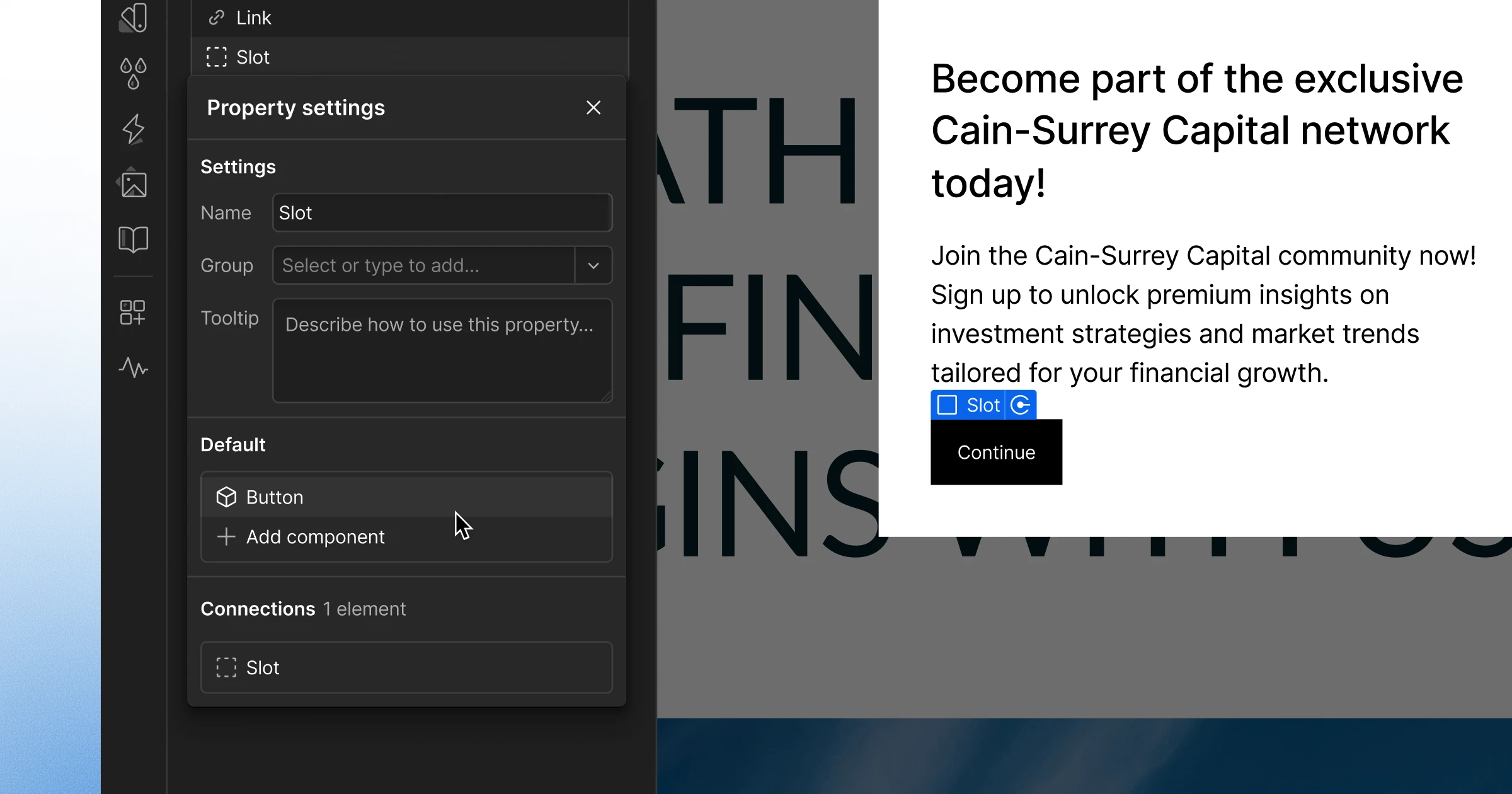
An empty slot doesn't tell a marketer much about what should go in there. You can now add a default component to a slot on a main component, so every new instance already comes filled in and ready to customize. When you change the default, every instance that still uses it updates as well, while marketers can still swap, reset, or clear the content.
Jitter multi-brainstorm

Jitter's AI Brainstorm can now explore multiple creative directions at once. Select your scene, click the ✨ icon, choose Brainstorm, and pick several of the suggested directions (or type your own). You'll get a separate animation for each one, so it's easy to compare them side by side. Also new: exports at 23.976, 24, and 29.97 FPS, faster rendering for layered effects, and snapping animations to the playhead.
Spline comments with AI

Comments in Spline's 3D editor have been rebuilt with a comments panel, proper resolving, unread markers, and previews when you hover a pin. A nice touch: opening a thread moves the camera to the commenter's view. You can also send a thread to Spline's AI agent, which makes the change, checks it from the commenter's camera, and replies with what it did. And Claude, ChatGPT, or any other MCP client can now read, reply to, and resolve comments too.
Rive updates
As always, a long list of Rive updates spread over two CLI releases and an editor update. Here are the ones most relevant for designers:
- Animate fonts: Picking a different font or style for a text style in Animate mode now adds a key.
- Clearer mesh names: Meshes now take the name of the image or component they deform, so "Arm" gets an "Arm Mesh".
- Agents can create bones: The AI Agent and MCP can create bones and bone chains, and agent edits that would break a file are now refused.
- Angular gradients: A gradient that sweeps around a center point, which can now also be animated inside components.
- AnimaScript: Rive's scripting language can now run work on separate threads and even generate audio. Those Flash days keep getting closer.
James McDonald: Building beautiful websites with Claude
In the latest Dive Club episode, James McDonald shows how he designs and builds websites with Claude for his first contract where he's also the builder. What stood out to me is how he creates small custom tools, like pattern generators with a randomize button, to explore visual motifs he would never get to in Figma. He still uses Figma for the overall layout, but moves to Claude for animations and the finer details. A great behind-the-scenes look if you're a designer who wants to start building.