Design Thursday #123
A weekly recap of everything you need to know about tools, events, guidelines and design in general.


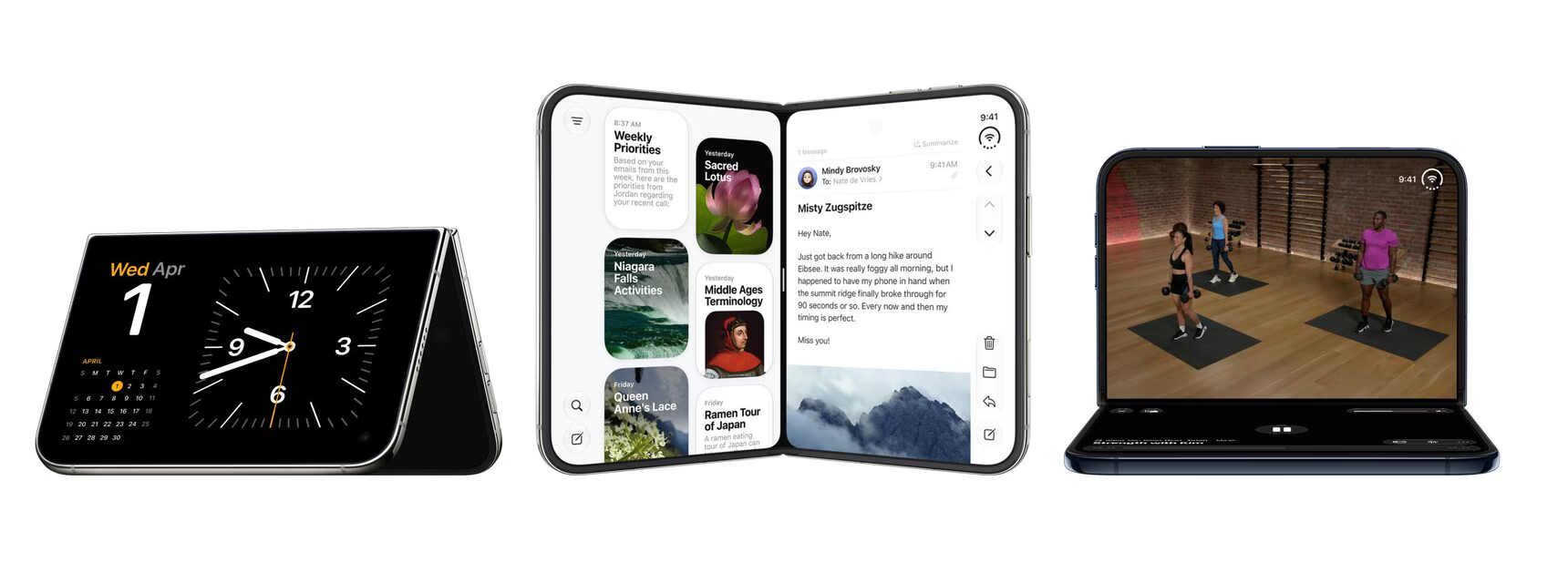
Submit your iPhone Duo apps
iPhone Duo will be available on October 23, and you can already submit apps that support it in App Store Connect. Good to know: starting April 2027, every app you submit will need iPhone Duo screenshots, so your App Store page will need some new assets as well. To get started, recompile your app with Xcode 27.1 and use Device Hub or the new iPhone Duo simulator to see how it behaves in every pose.
Apple also shared three steps to get your app ready. Here are the main things to look out for:
- Stop sizing from the screen: your app resizes every time the device folds or unfolds, so replace
UIScreen.main.boundswith the view or window bounds, or useGeometryReaderin SwiftUI. - Don't use orientation, idiom, or size class to pick a layout: a regular width no longer means it's an iPad, so base your layout on the available space instead.
- Check your full-bleed media: images and videos set to fill can crop important content on the wider inner display.
- Go edge to edge with the iOS 27.1 SDK: your app will use the full display, but toolbars and tab bars become vertical under the status bar, so make sure your content adapts to that.
There's also an app resizability skill in Xcode's coding assistant that scans your project for these issues. Using a different coding agent? Export it with xcrun agent skills export.
The Figma agent is out of beta
The Figma agent is now generally available, it's faster than before and comes with quite a few new features:
- Guidelines: upload markdown files with rules, best practices, and antipatterns to a design library. The agent reads them every time someone prompts with that library enabled.
- Follow your teammates' agents: click the chat pile to see their agents working live on the canvas.
- More context: ask the agent to search for files across Figma, attach design files, FigJam stickies, or Slides content via the + button, or paste Figma nodes straight into the prompt box.
- Image edits: choose which image model to use when editing images on the canvas.
- Custom skills: brainstorm, create, and publish your own skills with the agent, now also on the Starter plan.
Generative plugins are also generally available now.
Paper Mono
Paper released their own monospace font, Paper Mono, and it's open source and free to use. The goal was a mono font that works everywhere, from marketing sites to code. It has a variable font weight, coding ligatures, and duospacing, which makes it a lot more comfortable to read for longer pieces of text. A nice addition if you're looking for a mono font for your next project.
Rive's October release
A few months ago I said Rive is starting to look more and more like the old Flash days. Well, you can now literally import your Flash and Adobe Animate files into Rive. Here's what's new:
- Flash and Animate converter: drag a .fla file or zipped XFL folder into a project, and it converts into a Rive file. Symbols become artboards, frame labels become state machine states, buttons keep their hover and pressed states, and sounds, tweens, and IK bones carry over too. It's now out of Early Access.
- Mouse wheel and trackpad scrolling: scroll views now also work with a mouse wheel or trackpad, not just by dragging. It works in the editor, share links, and the web and Flutter runtimes, but not on iOS and Android yet.
- Right-click and middle-click listeners: choose which mouse button triggers a listener.
- More controllers on Windows: PlayStation, Switch Pro, and most generic controllers now work in the Windows editor.
- Inner and outer strokes (Early Access): choose whether a stroke sits inside, centered, or outside. For now, only the Rive Renderer supports this.
Stark updates
Stark's new data pipeline is starting to show results. In the asset detail view, you can now see which issues are new, which ones are stale (you can set how long that takes in the Governance tab), and which are duplicates that show up across multiple pages, like an issue in your footer. You can also add multiple assets of the same type to one project, for example several design system files, and rename them to keep things organized. On top of that, the app loads a lot faster, and AI features like auto-annotations, alt-text suggestions, and Help me fix it are up to 10x quicker. Figma shaders are now also supported in the Contrast tool.
Pen.dev paid plans
Pen.dev is introducing paid plans on October 15th. Designing on the canvas stays free, but working with agents will mostly be part of the paid plans:
- Free: the full editor, libraries, shared workspaces, and exports, plus 5 Agent days a month with unlimited MCP tool calls on those days.
- Pro ($16 per user/month): unlimited Agent days and up to 3 agents running at once.
- Ultra ($48 per user/month): unlimited Agent days, up to 6 agents at once, and model credits shared across your organization.
- Enterprise: custom plan and pricing.
Prices are billed annually. If you pick an annual Pro or Ultra plan before October 31st, you get 50% off your first year.
What's new in Claude
Anthropic posted a recap of what changed in Claude in September. Chat and Cowork are now one Claude, so you no longer have to pick a mode, and the work runs in the cloud, so it keeps going when you close your laptop. You can also create docs, slide decks, and designs in any conversation, based on everything you already discussed, and highlight a specific part to let Claude change only that. With Claude Docs, your team can work in the same doc as Claude and mention it in a comment to make changes. It's all powered by the new Claude 5.5 models, and if you already know what you need, type /slides, /docs, or /designs to skip straight to it.
OpenDots
At DevDay, OpenAI introduced Dots, always-on AI coworkers with their own computer that keep working after you close the chat. CopilotKit already released an open-source alternative: OpenDots. Each Dot gets its own browser, files, and terminal, and you can call them in real time, mention them in Slack, or work on docs together. You can host it yourself, bring any agent via AG-UI, and use any OpenAI-compatible model, so you're not limited to OpenAI's models, plans, or regions.