Design Thursday #112
A weekly recap of everything you need to know about tools, events, guidelines and design in general.


Figma: code-backed screens with variables attached
When you bring code-backed screens onto the canvas, colors, type, and spacing now bind to the variables already in your file instead of using as hardcoded values. This works whether you copy a Make preview onto the canvas, generate a design from code through the Figma MCP server, or capture a live web page with the Chrome extension. Frames also come in with auto layout now, so edits resize and reflow instead of needing manual cleanup. Basically, bringing coded or legacy screens back into Figma should feel a lot less like starting over.
Framer: interactive shaders
Two more shaders got mouse interaction: Liquid Gradient and Logo Gradient. Liquid Gradient creates animated color fields that move across your screen, while Logo Gradient adds shifting gradient effects to SVGs and PNGs. Both track your cursor with smooth, spring-based motion, so you get WebGL effects that actually respond to interaction. Select your shader, click the plus next to Mouse, and you're set.

Sketch Florence beta
Some nice updates were added in the latest Sketch beta:
- Stacks got more flexible: min/max sizes, relative (%) sizing for items, negative spacing values, and control over z-index and border inclusion.
- Effects and shadows expanded: blurs on groups, multiple drop shadows on frames without fills, and glass and fade effects combined on the same layer.
- Support dropped for macOS 14, so make sure you're up to date if you want to keep using new versions.
- Plus a bunch of smaller improvements: much faster image handling, smart guides in the Scale tool, and Display P3 support in the prototype player.
Rive: character animation gets upgraded
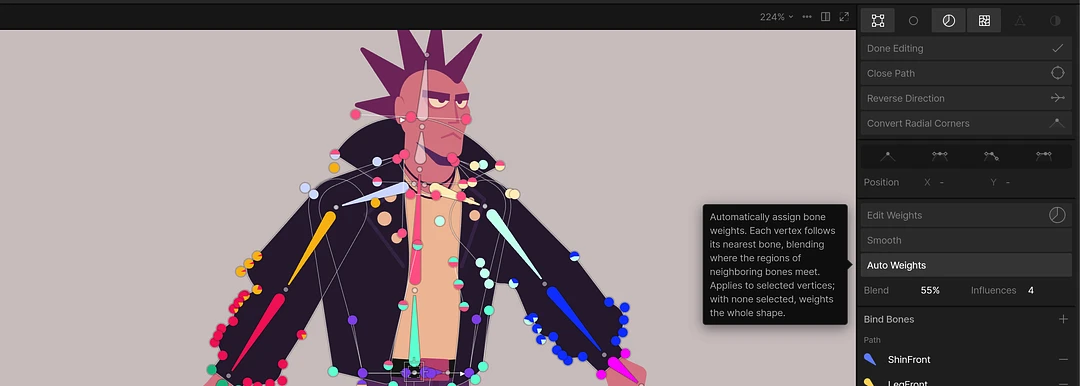
Rive added a big batch of rigging tools this week, aimed at anyone doing character animation. Auto Trace generates a mesh straight from an image, and Auto Weights automatically assigns bone weights to meshes and vector paths. The Edit Mesh/Vertices workflow is also improved with a contextual toolbar, view options, and support for binding multiple meshes at once. On top of that, there's now align and distribute for state machine states, and the AI Agent can use all of these tools too.
Webflow updates
- Mouse move animations in GSAP: Interactions now has a Mouse Move trigger, a Mouse Follow action, and interval actions, so cursor-following elements, magnetic buttons, and spotlight effects no longer need custom GSAP code.
- Component Slots support Elements: you can now drop any element (images, collection lists, rich text, ...) directly into a Slot instead of having to wrap it in a Component first.
- MCP 2.0: a big update that adds design system support, dynamic content connections, and font management, and mostly removes the need for the bridge app. It also adds agent instructions, site performance analysis, and governance features like branch-based edits and activity logs.

Jitter updates
- Letter spacing animations: animate letter spacing on text for kinetic typography or title emphasis. Select your text layer, go to Custom, and pick Letter spacing.
- Bulk Create: generate hundreds of video variations at once via CSV import, filling in text and image overrides per row.
- Jitter AI can now also pull in stock photos and videos from Pixabay and Pexels straight from the chat.

Lottie Creator 2.0
The biggest update to Creator yet brings an AI Motion Copilot and a full graph editor. Motion Copilot builds shapes, fills, shadows, and keyframed animations from a single prompt, and shows its plan before any destructive edit. The Graph Editor gives you direct control over how properties change over time, with easing presets you can copy across layers. Performance also improved across the board, including new WebGL support.
MagicPath visual editor
MagicPath launched a visual editor that lets you drag, resize, duplicate, and edit inside your actual live app or website, not a static mock. It works with code from any coding agent, Codex, Cursor, or Claude Code, and lets you edit the deployed result with the ease of a Figma file.
Pencil is now pen.dev
Pencil rebranded to pen.dev. Same product, just a shorter name that matches what you were making all along: pen files. Just install the update as usual to switch over.

Pablo Stanley on protecting your creativity in an AI world
Dive Club's latest episode has Pablo Stanley talking through his creative tools, including Efecto and hilos, and how he prototyped the new design mode in Vercel's v0. He also gets into what historic artists like Sol LeWitt and Andy Warhol can teach us about delegation and creativity, and why he forced himself to make pixel art by hand instead of reaching for AI. A good watch if you've been wondering how much of your process you should hand off to a model.